
This page describes how to create new service records for an asset. Service records document installations, repairs and maintenance activities performed over the lifetime of the asset and form the core of its digital history.
Record Types
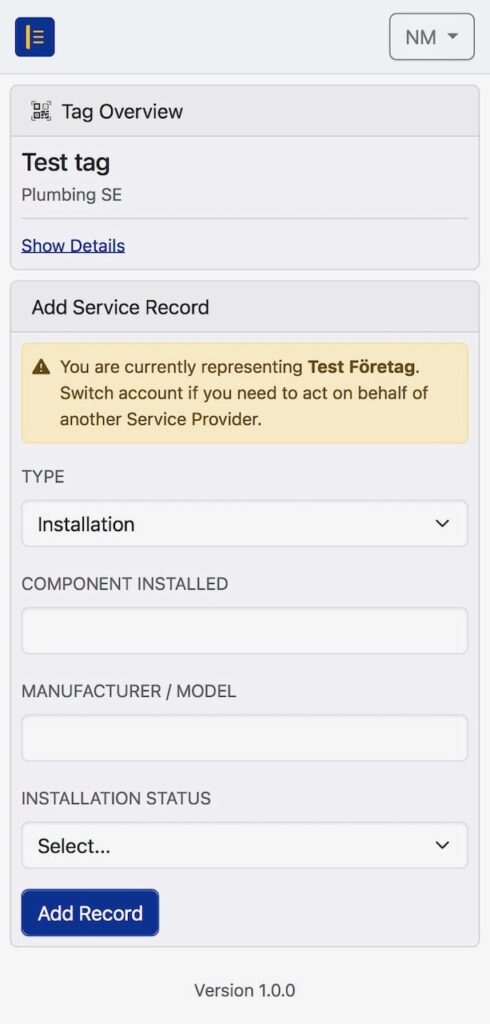
When adding a service record, the user must select the correct Type.
The platform will automatically display the fields required for that activity.
Common record types include:
- Installation – used when fitting or commissioning components
- Repair – used for corrective or remedial actions
- Maintenance – used for scheduled or routine servicing
The available fields vary depending on the selected type and the asset’s trade category.
Completing a Service Record
To add a new record:
- Select the appropriate Type.
- Enter the information shown on the form.
Typical fields may include:- Component installed or serviced
- Manufacturer or model
- Status of the work performed
- Notes or descriptions of issues observed
- Review the information for accuracy.
- Submit the entry by selecting Add Record.
Once submitted, the record becomes part of the asset’s permanent documentation and cannot be deleted.
Trade Category–Specific Fields
Different trade categories may introduce specialised fields.
Examples:
- Plumbing: component details, installation status
- Electrical: model or equipment identification
- HVAC and Lift: operational notes, commissioning information
The platform ensures that only relevant fields appear for the technician’s trade category.
Linked Service Provider
If the user has access to multiple service providers, ASL may prompt them to confirm which organisation they represent.
The selected service provider is stored with the record for traceability.
Observing Previous Work
After saving a service record, users can scroll through the asset history to evaluate previous installations, issues or repairs.
This enables better decision-making during future maintenance work.
Correcting Mistakes
If incorrect information was entered in a service record, the entry may be modified according to organisational permissions.
For instructions on how to update or amend existing records, see: