This page provides a high-level introduction to the ASL platform. It explains how the system is structured, how each component interacts, and how service-related data flows through the platform. The goal is to give new users a clear understanding of the platform’s fundamental concepts before proceeding to detailed configuration or operational guides.
System Definition
ASL (Asset Service Ledger) is a web-based platform for managing and sharing digital maintenance histories for technical installations. Each installation is linked to a unique QR tag that provides direct access to its service record. The platform operates as a neutral, standardised documentation layer for technicians, property owners and compliance stakeholders across the European Union.
ASL is accessed entirely through a web browser. No mobile application is required.
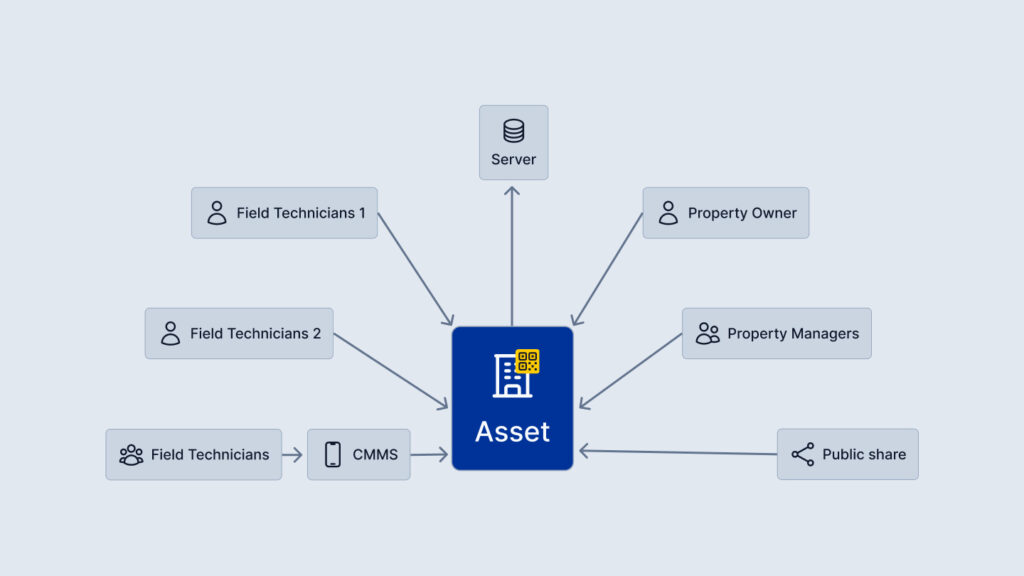
Core System Components
QR Tag
A durable physical tag assigned to an installation.
Contains a unique identifier used to retrieve the associated digital service ledger.
Asset Profile
The digital representation of a technical installation.
Stores metadata such as asset type, location, owner and operational notes.
Service Record
A timestamped entry documenting a performed maintenance action, inspection or corrective measure.
Each record includes:
- Date and time
- Technician identity
- Action description
- Optional attachments (photos, documents)
User Roles and Permissions
Access to data is role-based.
Typical roles include:
- Public Viewer: Can access limited, non-sensitive information.
- Verified Technician: Can add, modify or append service records.
- Asset Owner / Manager: Can view full historical data.
Web Application Interface
The user-facing component where technicians and owners access asset data, submit service records and manage organisation settings.
Data Storage Layer
A secure, cloud-based dataset where all asset profiles and service records are stored.
Data is linked permanently to the asset, not to the individual service provider.
API Layer
Provides integration endpoints for external systems such as CMMS, facility management software and compliance reporting tools.
Allows import, export or synchronisation of asset and service data.
End-to-End Data Flow
The standard operational flow when interacting with an asset is as follows:
- Scan QR Tag
The user scans the tag using any smartphone camera, which resolves a secure URL pointing to the asset’s digital profile. - Asset Lookup
The platform retrieves the asset’s profile and associated service history. - Permission Evaluation
The system determines what data the user is permitted to see or modify based on role and authentication status. - Data Access or Input
- Public users may view limited asset information.
- Verified technicians may create new service records or attach documentation.
- Record Submission
The new or modified record is validated and saved to the central data store. - Ledger Update
The service history is immediately updated and becomes visible to all authorised stakeholders. - Lifecycle Continuity
The record remains attached to the asset across ownership changes, service provider changes or operational lifecycle events.
System Characteristics
Neutral and Asset-Centred Architecture
All data is linked to the asset, ensuring continuity regardless of who performs the work.
No App Requirement
Access and updates are performed directly via a browser, reducing onboarding complexity.
Role-Based Data Protection
The system ensures that sensitive information is only available to authorised users in accordance with GDPR requirements.
Standardised Data Structure
All service entries follow a uniform format that supports traceability, auditing and interoperability.
Typical Use Cases
- Field technicians documenting maintenance actions on-site
- Property owners verifying maintenance compliance
- Inspectors reviewing installation histories during audits
- Service organisations coordinating teams and verifying performed work
- External systems retrieving asset histories via API